Department of Social Work Education
Title IV-E Program Materials
BASW Application
The Title IV-E Program remains active. Stipends are contingent upon state and federal funding availability each year, and at this time we do not yet have confirmation of stipend availability for the 2027–2028 academic year.
We encourage all interested students to apply regardless, once the window opens.
If funding is not confirmed, we will not be able to offer stipends to students; however, if you do not apply, you will not be considered even if funding does become available. We will share updates on stipend opportunities as funding information becomes available.
------------------------------------
Thank you for your interest in the Title IV-E Child Welfare Education BASW Program. Please follow the instructions below carefully to complete your application.
APPLICATION DEADLINE: WILL OPEN NOVEMBER 6, 2026
- Submission Requirements:
- Complete the application in one sitting; it cannot be saved for later.
- For your reference, print or download this blank PDF BASW Program application to gather the necessary documents in advance.
- Filling Out the Application:
- Complete all sections using the MM/DD/YYYY format for dates and a US phone number (XXX-XXX-XXXX).
- If a section does not apply, type "N/A." For questions regarding phone numbers or dates, use your actual phone number or today's date.
- Program Eligibility:
- Part-Time Program Priority: Non-county employees may also be considered for the Part-time program; however, employees from qualifying agencies (CWS, DSS, CDSS, or Tribal agencies) have priority.
- Qualifying agency employees (CWS, DSS, CDSS, or Tribal agencies) can only apply for the Part-Time Program.
- Document Uploads:
- Please see the document upload requirements below. Ensure you have all these files and documents ready for upload when starting the application.
- Upload required documents as you complete each section of the application.
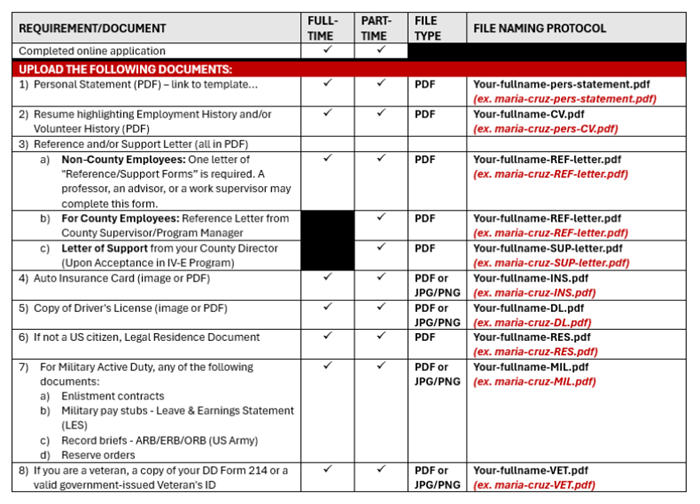
- Personal Statement:
- Download this BASW Personal Statement Questions MS WORD template.
- Carefully follow the instructions, and include all necessary information.
- Save it as a PDF using the file naming format:
- "Your-fullname-pers-statement.pdf" (e.g., maria-cruz-pers-statement.pdf) and upload it to the appropriate section.
- Avoid Duplicates
- Apply only once to prevent complications.
- If you need to correct a previously submitted application, don't hesitate to get in touch with Maxine Watson or Cheryl Whittle
- Contact Information:
- If you have questions or need assistance during the application process, feel free
to reach out via email:
- Maxine Watson at maxinew@mail.fresnostate.edu or
- Cheryl Whittle at cherylw@mail.fresnostate.edu
- If you have questions or need assistance during the application process, feel free
to reach out via email:
Applications are due by February 6, 2026 11:59 pm.
Attention Mobile Device Users: Please note the size of each file before you attempt to download. This application was not intended to be completed via a mobile device. Please use a computer/laptop for best results.
MSW Applicants:
The Title IV-E Program remains active. Stipends are contingent upon state and federal funding availability each year, and at this time we do not yet have confirmation of stipend availability for the 2027–2028 academic year.
We encourage all interested students to apply regardless, once the window opens.
If funding is not confirmed, we will not be able to offer stipends to students; however, if you do not apply, you will not be considered even if funding does become available. We will share updates on stipend opportunities as funding information becomes available.
----------------------------------------
Thank you for your interest in the Title IV-E Child Welfare Education MSW Program. Please follow the instructions below carefully to complete your application.
APPLICATION DEADLINE: WILL OPEN NOVEMBER 6, 2026
- Application Submission:
- The application must be completed and submitted in a single session. You cannot save your progress and return later.
- For your reference, print or download this blank PDF of the MSW program application to gather the necessary documents in advance.
- Filling Out the Application:
- Complete all sections using the MM/DD/YYYY format for dates and a US phone number (XXX-XXX-XXXX).
- If a section does not apply, type "N/A." For questions regarding phone numbers or dates, use your actual phone number or today's date.
- Program Eligibility:
- Part-Time Program Priority: Non-county employees may also be considered for the Part-time program; however, employees from qualifying agencies (CWS, DSS, CDSS, or Tribal agencies) have priority.
- County employees can only apply for the Part-Time Program.
- Personal Statement:
- Download this MSW Personal Statement Questions MS WORD template.
- Carefully follow the instructions and include all necessary information.
- Save it as a PDF using the file naming format:
- "Your-fullname-pers-statement.pdf" (e.g., maria-cruz-pers-statement.pdf) and upload it to the appropriate section.
- Document Uploads:
- Please see the document upload requirements below. Ensure you have all these files and documents ready for upload when starting the application.
- Upload required documents as you complete each section of the application.
- List of Required Documents for Upload
-
Avoid Duplicates:
-
Apply only once to prevent complications. If you need to correct a previously submitted application, please get in touch with Pearl Fraijo at pfann49@mail.fresnostate.edu or Cheryl Whittle at cherylw@mail.fresnostate.edu.
-
-
Contact Information:
- If you have questions or need assistance during the application process, feel free
to reach out via email:
- Pearl Fraijo at pfann49@mail.fresnostate.edu
- Cheryl Whittle at cherylw@mail.fresnostate.edu
- If you have questions or need assistance during the application process, feel free
to reach out via email:
Applications are due by March 13, 2026 11:59 pm.
Attention Mobile Device Users: Please note the size of each file before you attempt to download. This application was not intended to be completed via a mobile device. Please use a computer/laptop for best results.
Petition Instructions for Cal IV-E Participants
Cal IV-E participants (current students receiving Title IV-E financial support and former participants who previously received Title IV-E financial support) may submit a petition to request consideration of an exception to the standard program requirements. Petitions are reviewed on an individual basis in accordance with applicable program policies, grant requirements, and university procedures. Submission of a petition does not guarantee approval.
Where to Submit Petition Request Form:
Required Petition Materials
Gather and prepare the following, before submitting your Intent to Petition to make the process as efficient as possible.
Statement of Justification:
You will be asked to provide a written statement that addresses all the following:
· A clear description of the action or exception you are requesting through the petition process.
· A detailed explanation of the circumstances supporting your request.
· The reasons you believe the requested exception should be considered.
· Any specific dates or timeframes associated with your request (for example, if requesting a delay in beginning monetary repayment, indicate the proposed date on which you are requesting repayment to begin).
Supporting Documentation
You will need to gather documentation that supports and substantiates your request, as applicable. Examples may include, but are not limited to:
· Medical documentation
· Employment documentation
· Financial documentation
· Legal or court documents
· Other relevant third-party documentation
Supporting documentation should be relevant to the circumstances described in your Statement of Justification. The CSU, Fresno Title IV-E Program, may request additional information or documentation if necessary to complete its review. Be sure to redact personal information (account or social security numbers, etc.) See instructions for redacting below.
How to Redact Personal Information from documents
All documents submitted for your petition must be in PDF format. Before submitting, please redact (permanently black out or remove) sensitive personal information not required for review, such as full Social Security numbers, bank account numbers, or other identifying financial details. Only redact information that isn't necessary for processing your petition — if you're unsure whether something should be redacted, leave it visible or contact the Title IV-E office.
Option 1: Physical Documents (Recommended if you don't have Adobe Acrobat Pro)
- Print the document if it isn't already on paper.
- Use a solid black permanent marker (not a highlighter) to completely black out the sensitive information. Go over it multiple times to ensure the original text can't be read through the marker or held up to light.
- Double-check by holding the page up to a light source to confirm the information underneath is no longer visible.
- Scan the redacted document, or use your phone/computer's "Print to PDF" feature, and save it as a PDF for submission.
Option 2: Digital Documents
⚠️ Important: Simply covering text with a black box, highlight, or shape does not remove the underlying text on its own — it can often still be selected, copied, or revealed by editing the file. To make the redaction permanent, you'll need to flatten the document using Print to PDF (see below), or use a dedicated redaction tool if you have one.
- Open your document (e.g., in Word, or an image/photo editor) and draw a solid black box or shape over each piece of sensitive information you want to redact.
- Once all sensitive information is covered, use Print to PDF to save the file — select "Print," then choose "Print to PDF" or "Microsoft Print to PDF" as your printer, rather than saving or exporting directly to PDF. This flattens the document, permanently locking the black boxes in place so the covered text cannot be uncovered or removed.
- If you have Adobe Acrobat Pro (the paid version — not the free Adobe Reader), you can instead use its built-in Redact tool to permanently remove sensitive text and images, or delete the sensitive data directly from the document.
- If you don't have Acrobat Pro and aren't comfortable doing this digitally, you can also print the document, physically black out the information with a marker (see Option 1), and scan it.
For scanned images or photos:
Use basic photo editing software to draw a solid, opaque black box over the information, then print to pdf to convert it to a PDF.
A Few Reminders:
- Never send unredacted account numbers, full Social Security numbers, or similar sensitive data via email.
- Keep a personal copy of your unredacted original for your own records.
- All final submissions must be saved and uploaded as a PDF file.
- If you have questions about what needs to be redacted for your petition, contact the Title IV-E Office at (559) 278 - 3076
Review Process
Once all required petition materials have been received, your petition will be reviewed in accordance with the CSU, Fresno Title IV-E Program's established petition review procedures and applicable program policies.
The CSU, Fresno Title IV-E Program will make reasonable efforts to notify you of the petition decision within twenty (20) business days after receipt of a complete petition package, including all required supporting documentation. If additional information is needed or circumstances require additional review time, you will be notified accordingly.
If you have questions regarding the petition process or the required documentation, please contact the CSU, Fresno Title IV-E Program Coordinator, Cheryl A. Whittle, Ph.D.; LCSW at titleive@mail.fresnostate.edu.
You may also contact the Title IV-E office at (559) 278-3076.
- Applicant Letter
- Background of the Title IV-E Program, Historical Review, & Curriculum Development Process
- Prospective Student Playlist of videos - or go directly to the video of your choice selecting from list below -
- Child Welfare Worker Realistic Job Preview
- Title IV-E Student Recruitment Video
Virtual MSW/Title IV-E info sessions
(click titles to access each video)
MSW Title IV-E Graduate Admissions